Showing posts with label Problems. Show all posts

Friday, February 5, 2010

Problem 6: Faulty CD Drive

Problem: My MacBook's CD Drive sometimes fails to work. DVDs work fine, but sometimes it doesn't work with a CD. It would start spinning and stop 3 times and then eject the CD. It takes 2~5 times before the MacBook can read the CD. At times, there's a clicking noise made as well.

Cause of Problem: Faulty CD Drive

Time needed: 5 days

Model: 2 GHz Intel Core 2 Duo MacBook with Snow Leopard

First noticed on: My MacBook

Solution:
I called Apple Support, and they offered a free replacement (I had the Apple Care Protection Plan). They got a delivery man to me in 2 days, and it got back to me on the 5th day. Also, during diagnostics, the Apple Repair Center also noticed that my LCD was failing, so they replaced the LCD, the connector, and also the bezel.

Result: Parts replaced without charge

Tuesday, December 22, 2009

Problem 5: Failed Hard Drive

Problem: My LaCie drive no longer mounted, and disk utility said that I did not have permission to write on the disk. The hard drive was spinning properly.

Cause of Problem: Bad Harddrive

Time needed: 10 minutes ~ 1 week

Model: LaCie Rugged Drive 500gb 5200rpm

First noticed on: My MacBook

Solution:
1. Go to disk utility, select te hard drive and attempt to repair the disk
2. If repair fails, try to erase the disk
3. If erasing fails, or the hard drive still does not mount after erasing, contact LaCie support

Result: Your Hard Drive now works, or is replaced by LaCie

Saturday, January 10, 2009

Problem 4: Defective Battery

Problem: The MacBook's or MacBook Pro's battery goes down to around 5%~80% (varies for each battery, mine goes to around 35%) then shutdown with no warning. When rebooted (if able to) there is no window saying that the computer shutdown unexpectedly.

Cause of Problem: Defective Battery

Time needed: 2 minutes ~ 10 days

Model: Battery/Computer bought between February 2006 and April 2007 for MacBook or MacBook Pro

First noticed on: My MacBook

Solution:
1. Download the battery update. If it doesn't work go to step 2.
2. If your computer has been bought less than 1 year ago, go to step 4. If not go to step 3.
3. If your computer has an Intel Core Duo Processor and has been bought less than 2 years ago go to step 4. If not go to step 5.

4. Call apple and demand for a replacement. Get your computer and battery serial number out before you call them. If they reject at first, tell them that according to this page, you are covered (supposing that you bought your computer/battery between February 2007 and April 2007).

5. Go to a Retail Store to get it fixed. You will get 90 days of warranty for you battery. 
Or, you can buy a new battery for a more expensive price with 1 year of warranty.

Result: Your battery shouldn't have any problems.

Other: According to this page, Intel Core Duo MacBooks and MacBook Pros that are bought between 2007 February and April are covered for 2 years, even though the battery originally has a warranty of 1 year (including those with Apple Care). This can be a key tipping point for you to get that replacement.

Tuesday, November 4, 2008

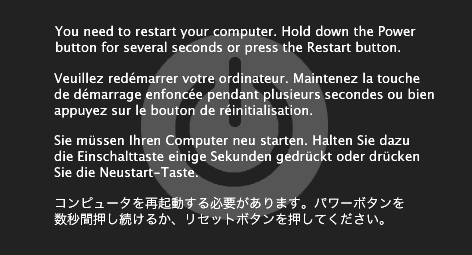
Problem 3: Kernel Panic


Problem: The mac got a Kernel Panic

Cause of Problem: An "internal fatal error"

Time needed: 30 seconds ~ 2 minutes (Depends on speed of Mac)

Model: Any type of mac.

First noticed on: My MacBook (happened twice)

Solution: Follow the instructions telling you to shutdown/restart your Mac. You can not do anything else with your Mac including saving.

Result: Your Mac should work fine after you restarted it.

Other: If a Kernel Panic repeatedly occurs in a sequence, contact Apple.

Tuesday, October 14, 2008

Problem 2: Nano won't show iCal & Contacts

Problem: iPod Nano (3rd Generation) won't show the your calendar events in iCal or your Contacts in the Contacts.

Cause of Problem: Unknown. Probably a bug.

Time needed: 2 minutes

Model: iPod Nano 3rd Generation

First Noticed on: My iPod Nano 3rd Generation

Solution: Reset your iPod (to find out how, go here) then highlight iCal but don't click it, and wait for a period of time. The time is different for different people, but I suggest 1 minute. If it doesn't work, wait a minute longer. Then, do the same for Contacts.

Result: Your calendar events and contacts will show

Other: If it still doesn't show after 10 tries, you should contact Apple

Problem 1: Scanner won't show up on PhotoShop

Problem: The Scanner won't show up on PhotoShop

Cause of Problem: The re-imaging of the iMac removed the software that would have recognized the scanner.

Time needed: 5 minutes

Model: CanoScan LiDE 500F

First noticed on: ELC iMac and Scanner

Solution: Go here then choose your Model (in this case, CanoScan LiDE 500F), select your OS (in this case, Mac OS X) then download the driver. Follow the steps during the installation.

Result: The scanner shows up on PhotoShop under import